
Webhook agents
Audience: Tenant admin and integration engineers
Goal: Register a webhook receiver, bootstrap an Edge Agent, and implement a compatible trigger endpoint in your stack.
Webhook delivery is event-driven: PrismBI cloud POSTs a signed JSON payload to your HTTPS URL when a task is queued. Your receiver verifies the signature, returns HTTP 2xx immediately (prefer 202 Accepted), then runs a one-shot Edge Agent to execute the task and exit.
Portal setup
Prerequisite: set Edge agent delivery to Webhook on Agents (/agents). See Agent configuration.
1. Save a webhook receiver
- Open Agents (
/agents). - Under Webhook receivers, enter your Webhook URL (the full HTTPS path PrismBI cloud will POST to, for example
https://hooks.example.com/prismbi/trigger). - Optionally set a custom auth header if an API gateway or function host requires an extra key (for example
x-api-key). - Click Save webhook receiver.
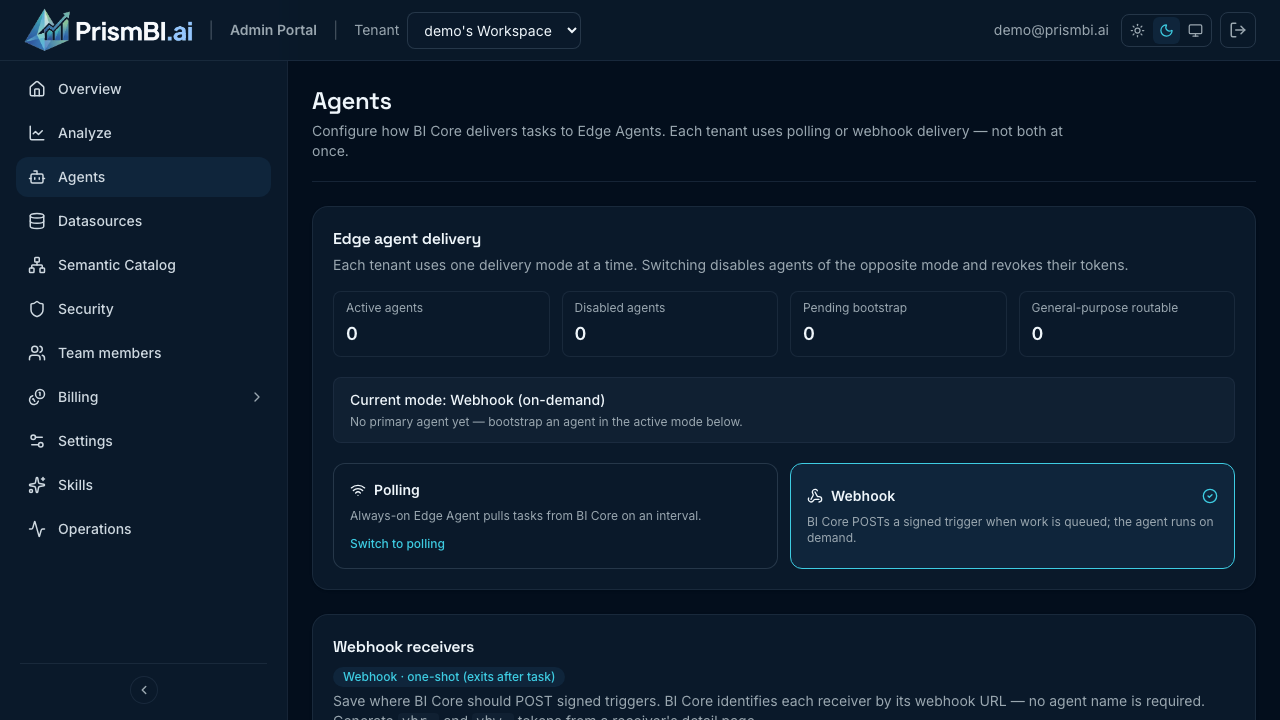
Figure: Save a receiver URL, open its detail page from the grid, then generate tokens and run Test connection.
2. Generate token pair
- Open the receiver row to open its detail page (
/agents/webhooks/:id). - Click Generate token pair.
- Copy both secrets immediately — they are shown once:
vbw_— webhook signing secret (verify triggers came from PrismBI cloud).vbr_— one-time bootstrap token (first agent registration only).
The bootstrap token is valid for 2 hours. Copy tokens to your receiver environment, then complete step 3 before expiry.
Store on your receiver host (names are conventions; map to your config system):
| Portal token | Suggested env var | Purpose |
|---|---|---|
vbw_… | PRISM_WEBHOOK_SECRET | HMAC verification of inbound POSTs |
vbr_… | PRISM_AGENT_TOKEN | First-run bootstrap only (until identity is persisted) |
Restart your receiver process after updating secrets.
3. Test connection (bootstrap)
Click Test connection. The portal sends a WEBHOOK_BOOTSTRAP trigger — not a real query.
Your receiver should:
- Verify the signature.
- Return 202 immediately.
- Start a one-shot Edge Agent that registers with PrismBI cloud (no query is run).
Wait until the detail page shows the linked agent as registered, then run Explore queries.
Receiver responsibilities
Your webhook endpoint is a thin trigger layer. It does not need to implement SQL or planning logic — the Edge Agent does that after bootstrap.
| Responsibility | Owner |
|---|---|
| Sign and send triggers | PrismBI cloud |
Verify X-Prism-Signature, optional gateway auth | Your receiver |
| Fast HTTP acknowledgment | Your receiver |
| Run task / bootstrap | Edge Agent (PRISM_RUN_MODE=once) |
Persist vba_ identity across runs | Your receiver (shared volume, secret store, or agent state path) |
HTTP contract
Request
| Item | Value |
|---|---|
| Method | POST |
| URL | Exact Webhook URL saved in the portal |
Content-Type | application/json |
| Body | UTF-8 JSON (see Payload) |
Required headers (from PrismBI cloud):
| Header | Description |
|---|---|
X-Prism-Timestamp | Unix epoch milliseconds as a string (for example 1720000000123) |
X-Prism-Signature | Lowercase hex HMAC-SHA256 of timestamp + "." + rawBody |
Optional header (portal configuration):
If you configured Auth header name and Auth header value on the receiver, PrismBI cloud sends that header on every dispatch (for example x-api-key: <your-gateway-key>). Your receiver must require it if your infrastructure expects it.
Signature verification
PrismBI cloud signs with your vbw_ secret:
message = <X-Prism-Timestamp> + "." + <raw request body as UTF-8>
signature = HMAC_SHA256(key=vbw_secret, message=message) as lowercase hex
Validation checklist:
- Reject missing
X-Prism-TimestamporX-Prism-Signature. - Reject timestamps older than 5 minutes (300 seconds) — compare clock skew in absolute value.
- Compute expected signature over the raw body bytes (before JSON re-serialization).
- Compare with
hmac.compare_digest/crypto.timingSafeEqual(constant-time). - Return 401 if verification fails.
Payload
JSON object sent by PrismBI cloud:
| Field | Type | Always present | Description |
|---|---|---|---|
taskId | string (UUID) | Yes | Task identifier |
tenantId | string (UUID) | Yes | Tenant that queued the work |
taskType | string | Yes | Task kind (see below) |
coreUrl | string | Yes | PrismBI cloud API URL the agent should call (coreUrl in payloads; may use host.docker.internal in local dev) |
expiresAt | string (ISO-8601) | Yes | Task expiry instant |
agentToken | string | Platform agent only | Bearer token for platform general-purpose agent; omitted for tenant webhook agents |
Common taskType values:
taskType | Spawns agent work? | Purpose |
|---|---|---|
WEBHOOK_BOOTSTRAP | Yes | Portal Test connection — register agent, no query |
WEBHOOK_PING | No | Legacy connectivity check (signature only) |
QUERY_PLAN | Yes | Explore / Analyze query execution |
TEST_CONNECTION | Yes | Datasource connection test |
SCHEMA_DISCOVERY | Yes | Schema snapshot job |
For tenant webhook agents, do not expect agentToken in the payload. The Edge Agent uses PRISM_AGENT_TOKEN (vbr_ on first run) or persisted state from a prior bootstrap.
Response
| Status | Meaning |
|---|---|
| 2xx (prefer 202) | Trigger accepted; PrismBI cloud records success |
| 401 | Signature or auth header failed |
| 4xx / 5xx | Dispatch failed — portal test shows error; tasks may retry via lease maintenance |
Return JSON quickly. Do not hold the HTTP request open until the Edge Agent finishes the query — run the agent asynchronously (background thread, queue, or separate container invocation).
Example success body (your format may vary; status code matters most):
{
  "status": "success",
  "data": {
    "accepted": true,
    "taskId": "11111111-1111-1111-1111-111111111111"
  }
}
Reference implementations
Adapt routing, logging, and idempotency to your platform (API Gateway + Lambda, Cloud Run, Kubernetes Job, Azure Function, etc.).
import hashlib
import hmac
import time
from fastapi import FastAPI, HTTPException, Request, Response

WEBHOOK_SECRET = "vbw_..."  # from portal
MAX_SIGNATURE_AGE_SECONDS = 300

app = FastAPI()

def verify_signature(secret: str, timestamp: str, body: bytes, signature: str) -> bool:
    if not secret or not timestamp or not signature:
        return False
    try:
        age = abs(time.time() - int(timestamp) / 1000)
    except ValueError:
        return False
    if age > MAX_SIGNATURE_AGE_SECONDS:
        return False
    expected = hmac.new(
        secret.encode("utf-8"),
        f"{timestamp}.{body.decode('utf-8')}".encode("utf-8"),
        hashlib.sha256,
    ).hexdigest()
    return hmac.compare_digest(expected, signature)

@app.post("/webhook/trigger")
async def trigger(request: Request, response: Response):
    body = await request.body()
    timestamp = request.headers.get("X-Prism-Timestamp", "")
    signature = request.headers.get("X-Prism-Signature", "")
    if not verify_signature(WEBHOOK_SECRET, timestamp, body, signature):
        raise HTTPException(status_code=401, detail="Invalid webhook signature")

    payload = await request.json()
    task_type = payload.get("taskType")

    if task_type == "WEBHOOK_PING":
        response.status_code = 202
        return {"status": "success", "data": {"accepted": True}}

    # WEBHOOK_BOOTSTRAP and real tasks: enqueue one-shot agent run (async).
    start_agent_async(payload)
    response.status_code = 202
return {"status": "success", "data": {"accepted": True, "taskId": payload.get("taskId")}}import crypto from 'node:crypto';
import express from 'express';
const WEBHOOK_SECRET = process.env.PRISM_WEBHOOK_SECRET;
const MAX_AGE_MS = 5 * 60 * 1000;
const app = express();
app.post(
'/webhook/trigger',
express.raw({ type: 'application/json' }),
(req, res) => {
const timestamp = req.header('X-Prism-Timestamp') ?? '';
const signature = req.header('X-Prism-Signature') ?? '';
const body = req.body.toString('utf8');
if (!verifySignature(WEBHOOK_SECRET, timestamp, body, signature)) {
return res.status(401).json({ status: 'error', message: 'Invalid webhook signature' });
}
const payload = JSON.parse(body);
if (payload.taskType !== 'WEBHOOK_PING') {
enqueueAgentRun(payload); // non-blocking
}
return res.status(202).json({ status: 'success', data: { accepted: true } });
},
);
function verifySignature(secret, timestamp, body, signature) {
if (!secret || !timestamp || !signature) return false;
const age = Math.abs(Date.now() - Number(timestamp));
if (Number.isNaN(age) || age > MAX_AGE_MS) return false;
const expected = crypto
.createHmac('sha256', secret)
.update(`${timestamp}.${body}`)
.digest('hex');
return crypto.timingSafeEqual(Buffer.from(expected), Buffer.from(signature));
}func verifySignature(secret, timestamp string, body []byte, signature string) bool {
if secret == "" || timestamp == "" || signature == "" {
return false
}
ms, err := strconv.ParseInt(timestamp, 10, 64)
if err != nil {
return false
}
if abs(time.Now().UnixMilli()-ms) > 300_000 {
return false
}
mac := hmac.New(sha256.New, []byte(secret))
mac.Write([]byte(timestamp + "."))
mac.Write(body)
expected := hex.EncodeToString(mac.Sum(nil))
return hmac.Equal([]byte(expected), []byte(signature))
}Starting the Edge Agent from your receiver
After verification, start a one-shot agent with:
| Variable | Value |
|---|---|
PRISM_CORE_URL | coreUrl from the payload |
PRISM_RUN_MODE | once |
PRISM_AGENT_TOKEN | vbr_… on first bootstrap; omit after identity is persisted |
PRISM_WEBHOOK_SECRET | vbw_… (if the agent image embeds a receiver — optional for external receivers) |
Persist agent identity between invocations (for example a Docker volume mounted at the agent state path) so later triggers reuse vba_ without sending vbr_ again.
Example local Docker invocation (adjust image and network for production):
docker run --rm \
  -e PRISM_CORE_URL=https://api.prismbi.ai \
  -e PRISM_RUN_MODE=once \
  -e PRISM_AGENT_TOKEN="vbr_<from-portal>" \
  -v voicebi-edge-state:/var/lib/voicebi-edge \
  ghcr.io/voicebi/prismbi:0.1.0
Local development reference
PrismBI ships a docker-webhook simulator for local testing (not for production). It implements the same signature check and spawns one-shot agent containers. See the docker-webhook repository README in the VoiceBI workspace.
For local development, the portal may accept http://localhost or http://127.0.0.1 webhook URLs. Spawned agents may receive coreUrl with host.docker.internal so containers can reach PrismBI cloud on the host.
Troubleshooting
| Issue | What to try |
|---|---|
| Test connection fails (401) | Confirm PRISM_WEBHOOK_SECRET matches portal vbw_; check clock skew |
| Bootstrap token expired | Regenerate token pair within 2 hours; update receiver env |
| Explore: no active webhook agent | Complete Test connection until receiver shows bootstrapped |
| Agent container cannot reach PrismBI cloud | Rewrite localhost to host-reachable URL inside container network |
| Task stuck after 202 | Check agent logs; verify PRISM_RUN_MODE=once and persisted state volume |
Related guides
- Agent configuration — choose polling vs webhook
- Polling Edge agents — long-running agent alternative
- Datasources — connection tests via webhook tasks
- Operations — task lease and retry behavior