
Skills
Audience: Tenant admin
Goal: Create and manage tenant skill packages that extend agent behavior in Analyze.
Open Skills (/system-settings/skills/tenant) in the sidebar. Tenant administrators use the Tenant skills tab to generate, enable, and review skill packages for their organization only.
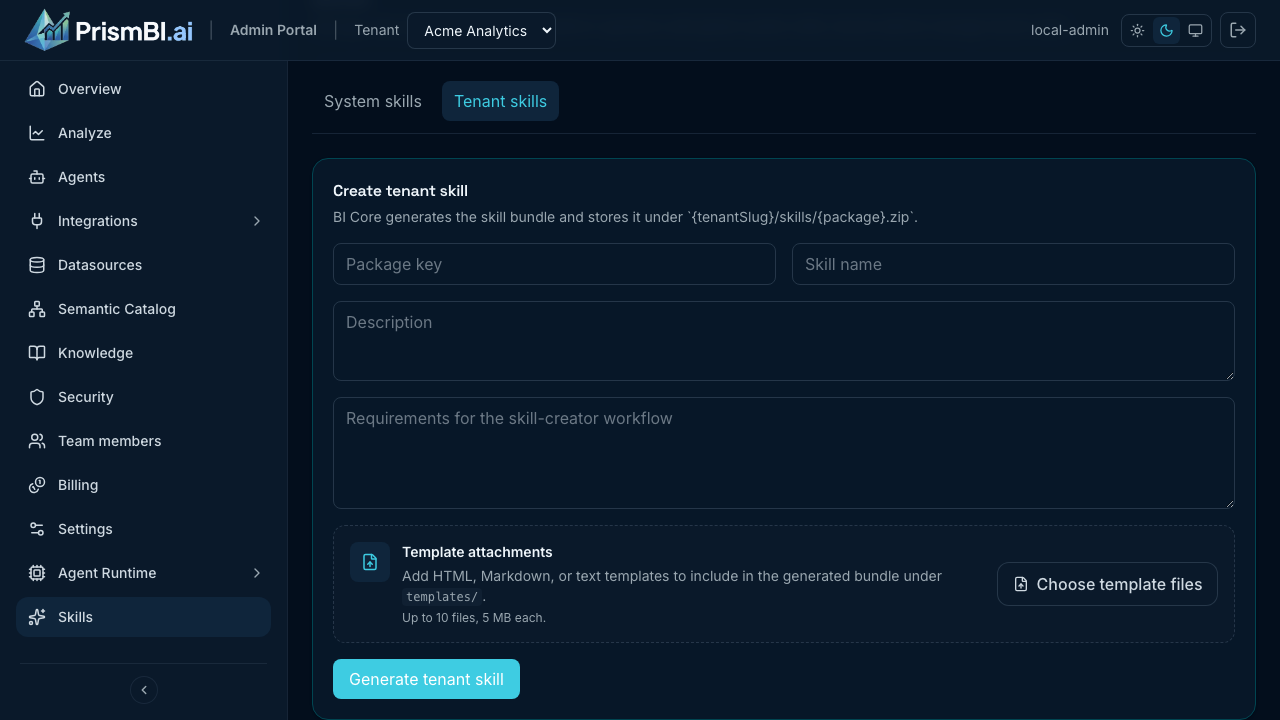
Figure: Tenant skills page — create form, packages, and planner toggles.
What skills do
Skills are zip bundles of instructions, scripts, templates, references, and assets that edge agents load at runtime. During Analyze, the planner can follow a skill’s SKILL.md workflow — for example running Python scripts, rendering HTML reports, or applying domain-specific analysis steps.
| Scope | Who manages it | Storage key (conceptual) |
|---|---|---|
| System skills | PrismBI platform operator | skills/{packageName}.zip |
| Tenant skills | Your tenant admin | {tenantSlug}/skills/{packageName}.zip |
System-wide packages are maintained by your PrismBI operator and are not editable from the tenant Skills page. Tenant skills apply only to agents serving your organization.
Inside a skill package
Generated bundles follow a consistent layout:
{packageName}/
  SKILL.md          # Main instructions the agent follows
  scripts/          # Python helpers (e.g. data prep, charts)
  references/       # Markdown context (metrics, frameworks)
  templates/        # HTML or text report templates
  assets/           # Images and static files
When a package is enabled, PrismBI cloud includes it in the agent config manifest. Edge agents download the zip, verify checksums, and extract files locally before running queries.
Create a tenant skill
Use Create tenant skill to describe what you need in plain language. PrismBI cloud runs the bundled skill-creator workflow asynchronously and stores the result in config storage.
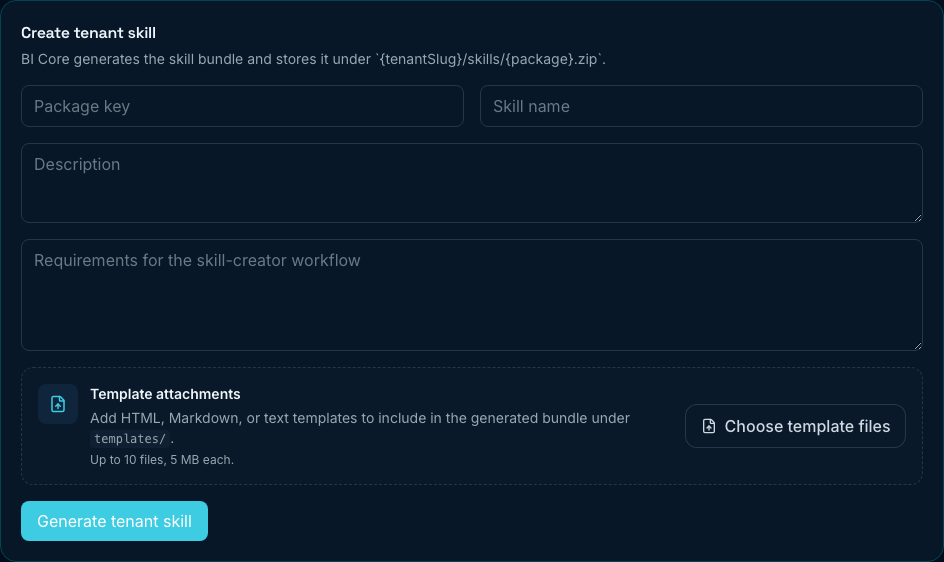
Figure: Package metadata, requirements, and optional template uploads.
Step by step
- Open Skills → Tenant skills.
- Fill in the form:
| Field | Purpose | Tips |
|---|---|---|
| Package key | Stable identifier (used in storage paths and agent manifest) | Lowercase with hyphens, e.g. quarterly-sales-summary |
| Skill name | Human-readable title shown in the portal | Short and descriptive |
| Description | What the skill is for | One or two sentences for admins |
| Requirements | Natural-language spec for skill-creator | Describe inputs, outputs, scripts, and report behavior |
- (Optional) Attach Template files — HTML, Markdown, plain text, JSON, YAML, CSV, or XML (up to 10 files, 5 MB each). Files are placed under
templates/in the generated bundle. Use this when the skill should render a fixed report layout. - Click Generate tenant skill.
- Wait for generation to finish (typically one to two minutes). The page polls job status automatically; failed jobs show an error you can retry after fixing requirements.
- When the package appears under Tenant skill packages, review contents and Enable skill when ready.
Writing good requirements
Be explicit about data sources, expected outputs (table, chart, HTML report), and any multi-step workflow. Example: “Build an executive summary from fact_sales: compute revenue and margin by month, generate two charts, and render report_template.html with placeholders for KPIs and narrative sections.”
After generation
New tenant packages are stored disabled by default. Enable them only after you preview SKILL.md and spot-check scripts or templates.
Manage tenant skill packages
Each package card shows status, resource counts, and actions.
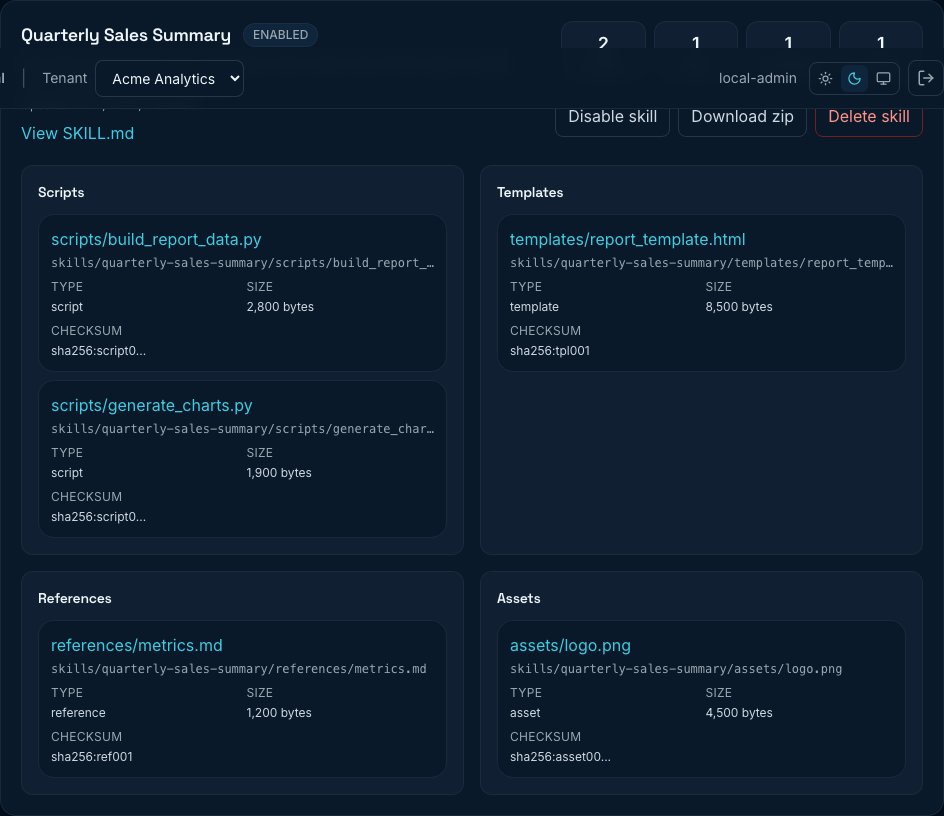
Figure: Enabled package with scripts, templates, references, and assets.
Package actions
| Action | Effect |
|---|---|
| Enable skill / Disable skill | Controls whether agents receive the bundle on the next config sync |
| View SKILL.md | Opens the main instruction file in a preview modal |
| Resource links | Preview individual scripts, templates, references, or assets |
| Download zip | Downloads the full package for backup or offline review |
| Delete skill | Removes the tenant package row and deletes its zip from config storage (irreversible) |
Resource counts (Scripts, Refs, Templates, Assets) summarize manifest entries. Click any file path to preview content without downloading the whole zip.
Enablement and agents
- Disabled packages stay in storage but are excluded from the agent manifest.
- Enabling or deleting a package bumps skill bundle revision so connected edge agents refresh on their next heartbeat.
- Test with a dedicated Analyze session after enabling a new skill — confirm the agent follows the workflow and report templates render correctly.
Planner skill toggles
Below packages, Planner skill toggles control tenant planner skill entries referenced in Analyze query context. These are separate from zip bundles: they are lightweight config entries (name, description, enabled flag) stored in planner config.
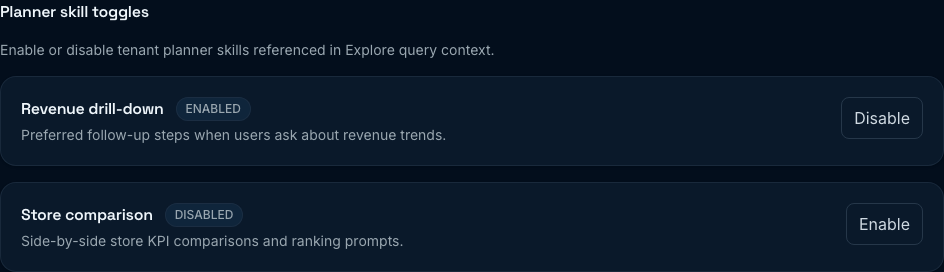
Figure: Enable or disable planner skills used as Explore context hints.
- Review each listed skill’s name and description.
- Click Enable or Disable to stage changes.
- Click Save planner skill toggles when one or more skills changed.
Planner skills may be added when learned-skill proposals are approved (if that feature is enabled for your tenant). If the list is empty, only skill packages above apply to agent behavior.
How skills reach Analyze
- You generate and enable a tenant skill in the portal.
- PrismBI cloud registers metadata and manifest JSON for the package.
- Edge agents pull
skillBundles[]from config, download each zip with checksum verification, and extract files to local cache. - During Analyze, the planner selects applicable skills and may call bundled scripts via the agent tool surface.
Security roles still apply: skills do not bypass datasource or field-level grants configured under Security roles.
Example use cases
| Use case | What to specify in requirements |
|---|---|
| Executive sales summary | Monthly revenue, margin, top categories; HTML report from an uploaded template |
| CSV upload analysis | Steps to profile uploaded files, chart distributions, return summary tables |
| Compliance narrative | Fixed sections referencing semantic entities; no raw PII fields |
| Recurring board pack | Reuse the same template with placeholders filled from query results |
Tips
- Keep package keys stable — agents and storage paths depend on them; prefer creating a new package over renaming.
- Upload report HTML templates when output layout matters; skill-creator can bind query metrics to placeholders.
- Start with one enabled skill per test agent profile before rolling out broadly to MEMBER users.
- Disable unused packages to shrink agent manifests and speed config sync.
- Check Operations if generation jobs fail or agents do not pick up changes after enable.
Troubleshooting
| Issue | What to try |
|---|---|
| Cannot open Skills | Requires tenant Admin and a tenant selected in the header |
| Generate tenant skill hangs or times out | Check Operations for the job; simplify requirements and retry |
| Generation job failed | Fix requirements text; ask your PrismBI operator to verify the cloud environment has Python available |
| Package list empty after success | Refresh the page; confirm you are on Tenant skills, not System skills |
| Skill not used in Analyze | Confirm package is enabled; verify agent is online and synced (see Polling Edge agents or Webhook agents) |
| Template not in output | Confirm file was attached before generation; preview templates/ in the package card |
| Agent still has old skill | Disable then re-enable, or restart agent sync; deletion also forces revision bump |
| Planner toggles missing | Normal if no learned skills were approved; package skills still apply via manifest |