
Agent configuration
Audience: Tenant admin
Goal: Choose how PrismBI cloud delivers work to Edge Agents in your network.
Each tenant uses one delivery mode at a time: Polling or Webhook. You configure this on Agents (/agents). Switching modes disables agents registered in the opposite mode and revokes their tokens.
Choose a delivery mode
Open Agents and review the Edge agent delivery panel at the top of the page.
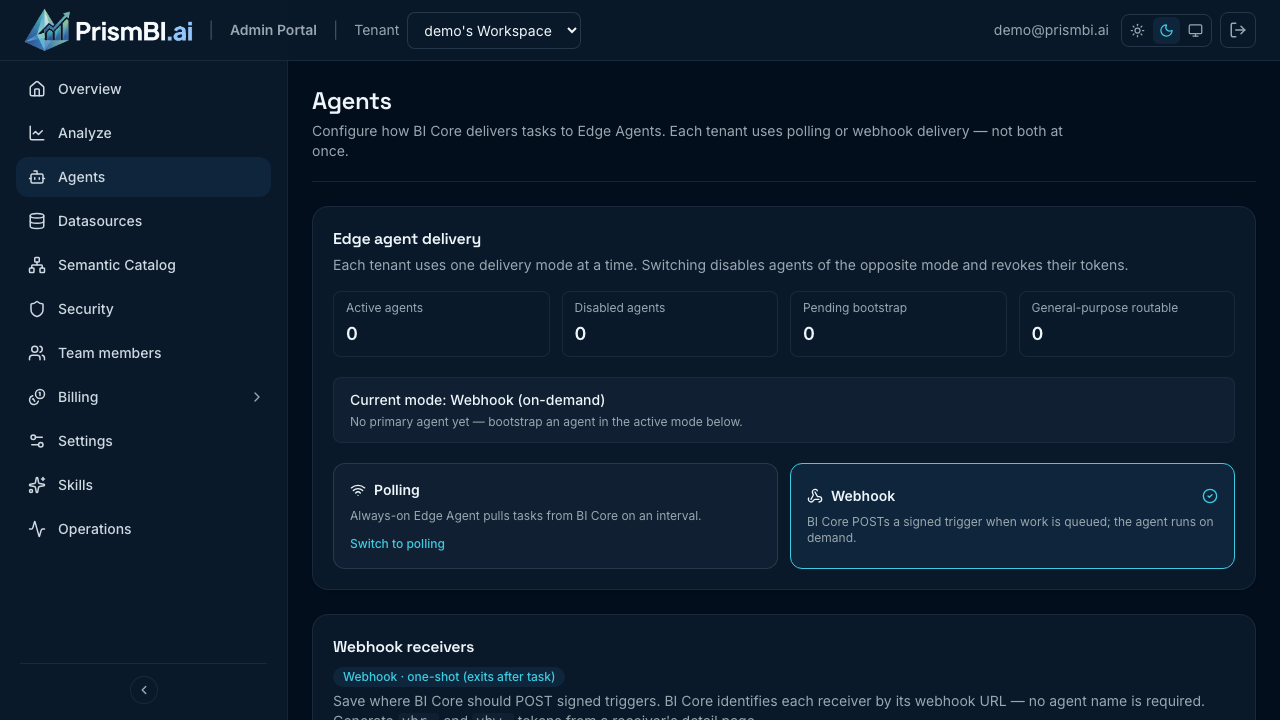
Figure: Polling vs webhook — one mode is active per tenant.
| Mode | How work starts | Agent process | Best for |
|---|---|---|---|
| Polling | Edge Agent pulls tasks from PrismBI cloud on an interval | Long-running container or VM | Traditional always-on deployments, simple ops |
| Webhook | PrismBI cloud POSTs a signed trigger when a task is queued | On-demand / one-shot (serverless, job runner, scale-to-zero) | Event-driven infra, per-query isolation, no idle agent |
Polling (HTTP poll)
- Deploy a long-running Edge Agent that maintains outbound HTTPS to PrismBI cloud.
- The agent heartbeats, polls for tasks, and stays online between queries.
- Bootstrap once with a portal
vbr_token; the agent persists a long-livedvba_token locally.
Guide: Polling Edge agents
Webhook
- Host an HTTPS endpoint in your network that PrismBI cloud calls when work is ready.
- Your receiver verifies PrismBI cloud’s signature, acknowledges quickly, then starts a one-shot Edge Agent run (container, function, or job).
- Register the receiver URL in the portal, generate a
vbr_+vbw_token pair, and run Test connection to bootstrap before Explore queries.
Guide: Webhook agents (portal setup + generic receiver implementation)
What stays the same
Regardless of delivery mode:
- Database credentials are set on the agent host or container, not stored in PrismBI cloud.
- Datasources reference environment variable names (for example
POSTGRES_PASSWORD); the agent resolves secrets at runtime. - Agents run read-only SQL and return results through PrismBI cloud to the Admin Portal.
- Per-agent Drivers and Runtime tabs apply after registration.
Switching modes
- Open Agents → Edge agent delivery.
- Select the other mode card (Polling or Webhook).
- Confirm the switch — agents of the previous mode are disabled and their tokens revoked.
Plan a short maintenance window: finish in-flight queries, bootstrap agents in the new mode, then re-test datasource connections.
Related guides
| Guide | Topic |
|---|---|
| Polling Edge agents | Bootstrap token, Docker deploy, drivers |
| Webhook agents | Receiver setup, payload contract, HMAC validation |
| Datasources | Assign agents, connection tests |
| Operations | Stuck tasks and retries |