
Polling Edge agents
Audience: Tenant admin
Goal: Register and monitor long-running Edge Agents that poll PrismBI cloud for work.
Polling agents maintain outbound HTTPS to PrismBI cloud, pull tasks on an interval, and stay online between queries. Database credentials never leave your environment.
To choose between polling and webhook delivery, start with Agent configuration.
Register a polling agent
Prerequisite: set Edge agent delivery to Polling on Agents (/agents).
- Open Agents (
/agents).
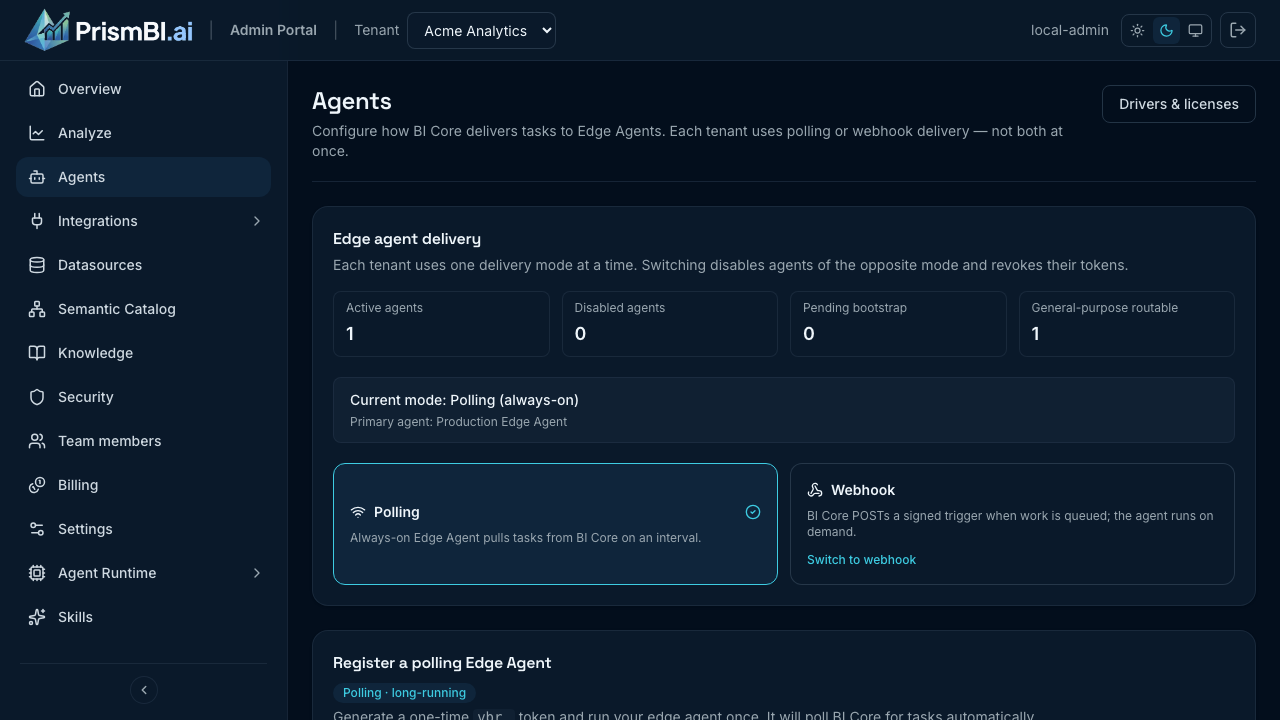
Figure: Delivery mode, polling registration, and registered agents.
- Under Register a polling Edge Agent, enter an agent name and environment (typically
production). - Click Generate bootstrap token and copy the
vbr_token immediately — it expires after about one hour. - Deploy the agent in your network. Production example:
docker pull ghcr.io/voicebi/prismbi:0.1.0

docker run -d --name prismbi-agent --restart unless-stopped \
  -p 8088:8088 \
  -e PRISM_CORE_URL=https://api.prismbi.ai \
  -e PRISM_AGENT_TOKEN="<bootstrap-token-from-portal>" \
  -e PRISM_AGENT_NAME=production-warehouse \
  -e PRISM_ENVIRONMENT=production \
  -e POSTGRES_USER=readonly \
  -e POSTGRES_PASSWORD='your-db-password' \
  -v prismbi-edge-state:/var/lib/voicebi-edge \
ghcr.io/voicebi/prismbi:0.1.0- Wait for status ONLINE and a recent heartbeat on the Agents list.
After the first successful bootstrap, the agent persists its long-lived vba_ token under /var/lib/voicebi-edge (or your configured state volume). Restarts do not require a new bootstrap token unless you revoke the agent.
Note: The
PRISM_*prefix replaces the legacyVOICEBI_*prefix used in older agent versions. Both are accepted for backward compatibility, butPRISM_*is recommended.
Agent detail
Open an agent to view Overview, Drivers, and Runtime tabs.
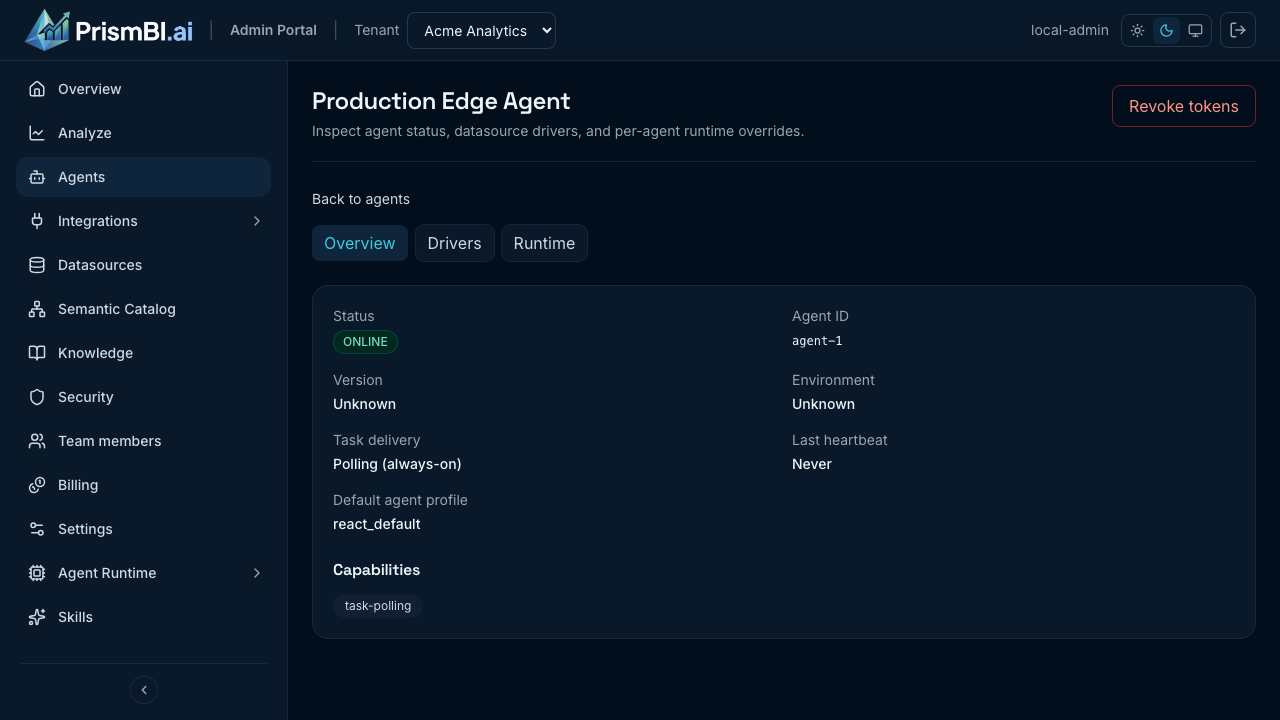
Figure: Per-agent overview and configuration tabs.
- Drivers — review which database connectors are installed and install the ones your datasources need (see Install database drivers).
- Runtime — optional per-agent overrides (for example Diagnostics / debug traces). Platform-wide defaults are managed by your PrismBI operator; tenant admins configure overrides here when needed.
Install database drivers
The standard Edge Agent image bundles SQLite, MySQL (PyMySQL, MIT), and DuckDB (MIT), plus the analysis stack for file uploads. Third-party copyright notices ship in the image. Every other connector—PostgreSQL, SQL Server, Oracle, Snowflake, ClickHouse, Cassandra, MongoDB, Neo4j, and so on—is installed on demand so the image stays free of restrictively-licensed packages until you accept them.
Install from the Drivers tab
- Open Agents → <agent> → Drivers.
- Find the connector your datasource needs. The table shows its License and whether it is Installed / Not installed.
- Click Install driver.
- In the dialog, review the driver's license, tick I acknowledge and accept this driver's license, then click Accept & install.
- The install is queued and runs on the agent's next heartbeat (about 30 seconds). When the status shows Installed, return to your datasource and run Test connection again.
You can also install a missing driver directly from a datasource: if Test connection fails because the driver is absent, an Install driver on agent prompt appears with the same license acknowledgment step.
License acknowledgment
Some drivers are distributed under copyleft licenses (for example PostgreSQL's driver is LGPL). The dialog flags these and requires you to accept the license before installing, because the driver is downloaded onto your Edge Agent from its public package index under its own terms—PrismBI does not redistribute it. Your acknowledgment (who, when, which connector and license) is recorded for audit.
Tip: MySQL ships in the standard image (PyMySQL, MIT). You do not need to accept a MySQL license or install a driver for basic MySQL datasources.
Restricted or air-gapped networks
On-demand install needs outbound access from the agent to its package index. If your network blocks this, ask your PrismBI operator to either bake the required drivers into a custom image or provide a driver bundle; the agent can then run with on-demand install disabled.
Database credentials on the agent
Datasource forms in the portal store variable names only (for example POSTGRES_USER, POSTGRES_PASSWORD). Set the secret values on the agent host—never stored in PrismBI cloud—using exports or docker run -e:
-e POSTGRES_USER=readonly \
-e POSTGRES_PASSWORD='your-db-password'
Use the same variable names you enter in the datasource form. If the portal shows env:SW_PW as the credential reference, export SW_PW on the agent (or pass -e SW_PW='…' to Docker).
Webhook alternative
If you prefer on-demand agents (serverless, scale-to-zero, or job-per-query), switch to webhook delivery and implement a signed trigger endpoint. See Webhook agents.
Tips
- One agent can serve multiple datasources in the same network zone.
- Registration tokens are single-use; generate a new token if deployment fails or the token expires.
- Use Operations to diagnose stuck tasks tied to an agent.
- Pin
ghcr.io/voicebi/prismbi:0.1.0(or your approved version) in production.
Troubleshooting
| Issue | What to try |
|---|---|
| Agent offline | Verify outbound HTTPS to https://api.prismbi.ai, token validity, and docker logs |
| Driver missing | Install the connector from the Drivers tab (accept the license) before schema discovery |
| Tasks not picked up | Confirm datasource is assigned to this agent (or shared with a reachable agent) |
| Health check | curl http://<agent-host>:8088/health |
Related guides
- Agent configuration — polling vs webhook
- Webhook agents — event-driven delivery
- Datasources — assign agents and run connection tests